 Baadal™
Tally on Cloud alternative
Tally stays in your office. Reach it from anywhere, no static IP.
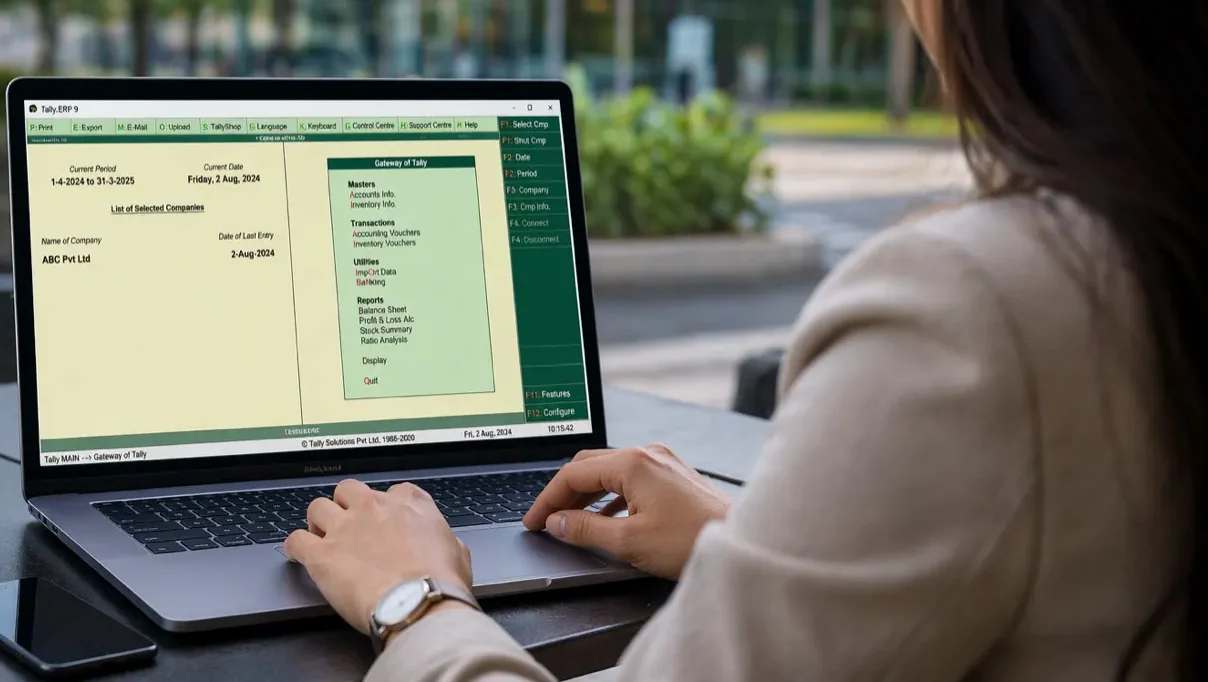
Tally runs on a Windows virtual machine on your Baadal. The office works over its own network, and people outside connect over a private, encrypted link, with no static IP, router changes or VPN to set up. Tally never runs on someone else’s server.
- On hardware you own
- No static IP or VPN
- Encrypted, and sealed to the device
- Tally reports on your phone
- Digital signatures work
Switch the set-up and the office internet to see where your books go and who can still work.
Your office

- HomeOwner’s Windows laptop
- Client’s officePartner’s MacBook
- BranchWindows PC
Hosting plans vary by provider. Remote access with Baadal needs the office internet to be up, and a Windows PC or a Mac with myBaadal.
What is Baadal for Tally?
A server in your office that runs your Tally.
Baadal is a private server that sits in your office. Your Tally runs on it, and your team opens the same Tally from home, a branch or a client’s office. It works like Tally on Cloud, except the server is yours, the books stay in your office, and Baadal charges nothing per user.
- 1
The Baadal sits in your office
A compact server on your office network. Your Tally books are stored on it, on encrypted drives.
- 2
Your Tally runs on it
Your own Tally, on a Windows machine inside the Baadal. The office team works on it over the office network, at full speed.
- 3
Your team opens it from anywhere
People at home or a branch install myBaadal on a Windows PC or a Mac and open the same Tally. No static IP or VPN to set up.
You bring your own Tally and Windows licences. We set the Baadal up, move your Tally data across and support it.
 Watch the 1-minute video
 Tally on your phone
Tally on mobile: your reports on your phone, no third-party server.
myBaadal shows your Tally data on Android, iPhone and the web, without opening Tally, as of the last sync to your Baadal. It works from a copy of your Tally data kept on your Baadal, so your books aren’t uploaded to anyone else’s cloud.
- TallyRunning on your Baadal
- A synced copyOn the same Baadal
- myBaadalOn your phone or in a browser
No third-party server in between
- Sales and purchase registers, invoices and the day book
- Receivables, payables, party ledgers and ageing
- Stock summary, item-wise quantities and values
- Cash and bank balances, GST summaries, profit & loss and balance sheet
Only people your admin gives permission to can open the Tally reports. From outside the office, the app reaches your Baadal over an encrypted connection through Baadal’s relay, the same way myBaadal opens your files.
Mehta TradersSample data · as of last sync
Sales this month₹38,92,400
Invoices this month312
Average invoice₹12,476
- Shah TradersSales 1041₹47,200
- Nair FoodsSales 1040₹82,600
- Desai & CoSales 1039₹15,930
Receivable₹12,46,000
Payable₹6,18,500
Over 60 days₹2,10,400
- Patel Exports72 days₹1,18,000
- Shah Traders38 days₹92,400
- Nair Foods12 days₹64,800
Stock value₹54,20,000
Items326
Low stock9
- MS Pipes 2"480 nos₹6,72,000
- GI Sheets210 nos₹4,93,500
- Elbow 2" (low)35 nos₹8,750
Bank balance₹18,40,950
Cash in hand₹1,12,300
GST payable₹2,14,700
- Net profit, Apr–Sep₹9,86,200
- Sales, Apr–Sep₹2,14,38,000
- Expenses, Apr–Sep₹41,26,400
Privacy
Tally data security: five layers around your books.
Your ledgers, GST data and client balances are the most sensitive files a business keeps. On Baadal they stay on hardware you own, in your office, and you set who gets in.
Layer 1 of 5
Tally’s own user rights, once switched on
With Tally’s security switched on, each person who opens Tally signs in and sees only what their Tally role allows. The Tally reports in myBaadal open only for people your admin allows.
Layer 2 of 5
Encrypted, and sealed to the device
The Baadal’s own drives are encrypted, and their key is held by the device’s security chip, so a drive taken out of the Baadal can’t be read in another computer.
Layer 3 of 5
In your office, on hardware you own
Tally runs on the Baadal on your premises, not on a hosting provider’s server.
Layer 4 of 5
Encrypted on the way in
Remote staff connect over Baadal Connect, a private, encrypted link from their computer to your Baadal. In the office, people work over your own network.
Layer 5 of 5
Who can reach Tally’s machine
People sign in to Tally’s Windows machine with the accounts you set up. In the Baadal’s admin panel, only the people you assign can see that machine, and you choose who may open its console or publish it to the internet. Admins can do everything.
Access
Tally remote access from home, a branch or a client’s office.
The Tally your team opens from outside is the same Tally running in the office, so everyone works in the same books. The Baadal connects out to Baadal’s relay, so there’s no static IP, port forwarding or VPN to set up. No backups to email or carry on pen drives, and nothing to reconcile later.
Office network
In the office
Over the office network at full speed. If the internet goes down, the office keeps working.
Baadal Connect
Tally from home
On a Windows PC or a Mac with myBaadal, over Baadal Connect. Needs the office internet to be up.
Baadal Connect
At a client’s office
Open the client’s books on your own laptop, the same way, without carrying a backup.
Baadal Connect
At a branch
Every branch posts to the same books instead of sending backups to head office.
Digital signatures work
Your DSC USB token stays plugged into the Baadal in your office and is passed through to Tally’s Windows machine, so you sign with Tally’s own digital-signature option. Signing from a remote Tally session uses a fix we install, tested with HyperPKI tokens on Windows Server 2022, and we test your own token during setup. A token plugged into a laptop at home isn’t passed through.
Print where you are
With Baadal Printer, a Windows PC prints from Tally to the printer it already has: a print preview opens, set the copies, press Print. For PCs used by one person at a time.
Three ways to run Tally
Tally on Cloud vs one office PC vs Tally on Baadal.
Tally on Cloud hosting rents you space on a provider’s server. Keeping Tally on one office PC keeps it close but stuck there. Baadal puts the server in your office and lets your team reach it from anywhere.
| What matters | Tally on one office PC | Tally on Cloud (rented hosting) | Tally on Baadal |
|---|---|---|---|
| Where the books sit | One computer in the office | The hosting provider’s server | Your Baadal, in your office |
| Working in the office | On that PC, or shared over the network | Over the internet, even at the next desk | Over the office network, at full speed |
| Working from outside | Usually not | Yes, over the internet | Yes, over Baadal Connect |
| Static IP, VPN or router changes | A remote-desktop app, or a static IP and VPN | Not needed | Not needed: the Baadal connects out to Baadal’s relay |
| If the office internet goes down | Office keeps working | The office is cut off; staff elsewhere keep working | Office keeps working; access from outside waits |
| Backups and rollback | Pen drives, when someone remembers | Provider’s policy | Snapshots of Tally’s machine, kept on the Baadal, to roll back an update |
| What you pay | The PC | Usually a monthly fee to the provider | One-time hardware + annual support plan, no per-user charges from Baadal |
Hosting plans vary by provider; check what yours includes, or see what Tally on Cloud costs. With Baadal you use your own Tally and Windows licences, which must cover your users and remote access.
Also included
Tally backup, updates and data migration, handled.
The whole team on the same company
Tally runs on a Windows virtual machine on the Baadal. Everyone posts to the same books in the same Tally, so there is nothing to merge later.
A save point before every update
Before a Tally release or a year-end change, shut Tally’s machine down and take a snapshot. Check your reports right after the update, and if one breaks, restore the snapshot before anyone posts new entries.
No copies on pen drives
Everyone opens the same books on the Baadal, so nobody carries a copy home on a pen drive or emails one to head office. Snapshots of Tally’s machine stay on the Baadal. For what each layer covers, see backup and recovery on Baadal.
We move your companies across
During setup we move your existing Tally data onto the Baadal and check it opens before your team switches over.
Who it’s for
Built for CA firms, traders, manufacturers and multi-branch businesses.
CA and tax firms
Client companies in Tally next to client folders, for partners, managers and articles.
See howManufacturers and traders
Sales, purchases and stock in Tally, alongside POs, challans and vendor files.
See howMulti-branch businesses
Branches that each bill, buy and hold stock, and a head office that needs every branch’s figures in one place at month-end.
Retailers and wholesalers
Billing counters and the back office post to the same Tally, on one server.
Getting started
How Tally on Baadal is set up, in four steps.
Tell us how you use Tally
How many people, which companies, who works from outside. A 20-minute call.
We size and set it up
We set up a Windows virtual machine with Tally on your Baadal before it ships, as part of the four-step Baadal setup.
We move your data
Your existing Tally companies come across, and we check they open.
Your team signs in
In the office, over the network. Outside, through myBaadal and Baadal Connect.
You use your own Tally and Windows licences. They must cover the users and the remote access you need, and we confirm this with you on the call.
What is a good alternative to Tally on Cloud?
If your team needs Tally outside the office but you don’t want your books on a hosting provider’s server, run Tally on a Baadal in your office. The books stay on hardware you own, the office works over its own network, and people outside connect over Baadal Connect. You buy the Baadal once and take an annual support plan, with no per-user charges from Baadal.
Can I access Tally remotely without a static IP?
Yes. The Baadal makes an encrypted connection out to Baadal’s relay, and remote staff reach it through that. You don’t need a static IP, port forwarding or any change to your office router, and no inbound ports are opened.
Do I need a VPN to use Tally from home?
There’s no VPN to set up. Staff install myBaadal on a Windows PC or a Mac and sign in, and Baadal Connect makes the private, encrypted link to your Baadal for them. It needs the office internet to be up.
Is this the same as “Tally on Cloud”?
Both let your team use Tally outside the office. The difference is where the server sits. Tally hosting puts your books on a provider’s server, usually for a monthly fee. With Baadal, Tally runs on a Baadal in your office: the office keeps working over the office network even if the internet drops, and remote staff reach it over Baadal Connect from a Windows PC or a Mac while the office internet is up.
Who can see our Tally data?
Your books sit on the Baadal in your office, not on a hosting provider’s server, and are encrypted at rest with the disk’s key sealed to the device. People sign in to Tally’s Windows machine with the accounts you set up, and with Tally’s security switched on, each person sees only what their Tally role allows. The Tally reports in myBaadal open only for people your admin gives permission to. Remote staff come in over Baadal Connect’s encrypted link, and in the admin panel only the people you assign can see Tally’s machine or open its console; admins can do everything. Snapshots of Tally’s machine stay on the Baadal, and Baadal’s support team can connect to give remote support under your annual support plan.
Can I see my Tally reports on my phone?
Yes. The myBaadal apps on Android and iPhone, and myBaadal on the web, show your sales and purchases, outstandings, stock, cash and bank balances, GST summaries, profit & loss and balance sheet, without opening Tally. They show your Tally data as of the last sync to a copy kept on your Baadal, not on anyone else’s cloud. From outside the office, the app reaches your Baadal over an encrypted connection through Baadal’s relay.
Does digital signature (DSC) work?
Yes. Your DSC USB token stays plugged into the Baadal in your office and is passed through to Tally’s Windows machine, so Tally’s own digital-signature option works. For signing from a remote Tally session we install a fix, tested with HyperPKI tokens on Windows Server 2022, and we test your own token during setup. The token has to be plugged into the Baadal, not into your laptop.
Do I need a new Tally licence?
Baadal doesn’t include a Tally licence: you use your own Tally and Windows licences. If they don’t already cover the users and remote access you need, you’ll need to upgrade or add to them, and we check this with you before setup.
Can my staff work on Tally from home?
Yes. On a Windows PC or a Mac with myBaadal, Baadal Connect sets up a private, encrypted link to your Baadal, so remote staff open the same Tally the office uses. It needs the office internet connection to be up.
What happens if the office internet goes down?
Everyone in the office keeps working in Tally over the office network. Only access from outside the office waits for the internet to come back.
Can we print invoices at home?
Yes, from a Windows PC. Baadal Printer sends the print to the printer that PC already has: a print preview opens, you set the copies and press Print. It’s meant for PCs used by one person at a time.
What if a Tally update breaks something?
Before you update, shut Tally’s machine down and take a snapshot. Check your companies and reports straight after the update. If one doesn’t open, restore the snapshot and the machine goes back to that moment. Entries made after the snapshot are not kept, so restore before anyone starts posting.
Can Busy, Marg or our ERP sit beside Tally?
Yes, if it installs on Windows or Linux. It gets its own virtual machine on the same Baadal, so it stays in your office like your Tally books, and you choose separately who can see and manage that machine. Your licences for that software are your own; we check them on the call.
How much does it cost?
You buy the Baadal once and take an annual support plan. There are no per-user charges from Baadal. We quote for your team size, storage and software after a short call.
Book a demo
Keep your books in your office. Open them from anywhere.
Book a 20-minute demo. We’ll show Tally on a Baadal, opened from the office and from outside, and tell you what it would take for your team.
No WhatsApp? Call +91 78620 22715, or message us on WhatsApp.
Tally and TallyPrime are trademarks of Tally Solutions Pvt. Ltd. Baadal is not affiliated with Tally Solutions.